


Villages GPS
4.2448.00 Reviews
App Specs
- Version
- 9.4
- Updated On
- License
- Free
- Downloads
- 10,000+
- Developer
- BK Partnerships, LLC.
- Categories
- Maps & Navigation
- Platform
- Android
Screenshots
 Analysis by AppCompare
I recently had the chance to dive into Villages GPS, an app that's been making waves among residents and visitors of The Villages, Florida. As someone who loves exploring new places without getting hopelessly lost, I was excited to see if this app could live up to the buzz. Spoiler alert: it does!
A local guide with a clear purpose
The Villages GPS is a free navigation app from BK Partnerships, LLC., built around getting people around The Villages rather than serving as a general-purpose map for every destination. That focus is its clearest strength: if your day involves golf-cart routes, local errands, or finding places within this Florida community, a guide tailored to the area can be more useful than starting with a nationwide map.
Its audience is fairly specific. I’d consider it for a resident who regularly travels between familiar destinations and for a visitor who wants help orienting themselves beyond a hotel or main road. If you need a navigator for a long road trip across several states, or want a single app for every city you visit, a broad mapping service is the more natural choice. This one makes most sense when The Villages is the destination, not merely one stop among many.
Making a first trip less intimidating
A realistic first outing might involve arriving in an unfamiliar part of town, heading to a recreation center, and then looking for a nearby place to eat. Rather than trying to remember a route from a quick glance at a map, I’d use voice directions to keep attention on driving and check the destination before setting off. For golf-cart travel in particular, getting the route settled while parked is a sensible habit; a screen is a distraction when you should be watching the path and other road users.
That preparation also helps with a practical question: does a local navigation app replace common sense about where a vehicle may go? No map should be treated as permission to use a route. I’d follow posted signs and local rules even if a suggested direction appears convenient, and stop somewhere safe if I needed to reconsider a turn. The app can help with orientation, but the person behind the wheel remains responsible for choosing a safe, permitted route.
Navigating the Maze of The Villages
The Villages is a sprawling retirement community, often referred to as "Florida's Friendliest Hometown," and it’s easy to see why. With loads of activities, golf courses, and shopping centers, it's a paradise for its residents. However, the sheer size and complexity can be overwhelming for newcomers. That's where Villages GPS comes in handy.
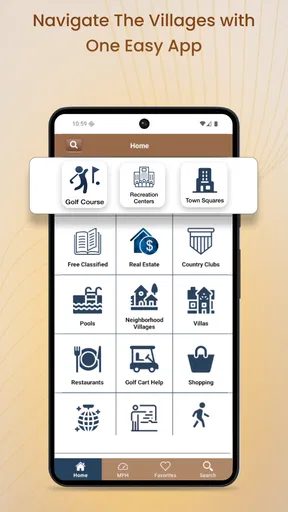
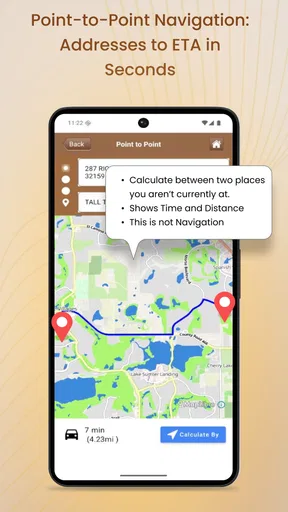
Upon launching the app, you're greeted with a clean and intuitive interface. The main screen provides quick access to popular destinations within The Villages, such as recreation centers, golf courses, and restaurants. The simplicity of the design ensures that even those who aren’t tech-savvy can navigate with ease.
Worth Reading Before You Choose

Flipboard Shows What News Apps Must Do Beyond the Feed

Switching to Android Auto Means Rethinking Your Driving Routine

Google Calendar Makes a Crowded Week Easier to Manage

Ludo King Makes the Most of the Minutes Between Plans

Baby Panda World Brings Quick Play to Modern Phones, but Its Game Library Feels Busy

ESPN’s Live Game View Makes Following Close Games Easier
Features That Make Life Easier
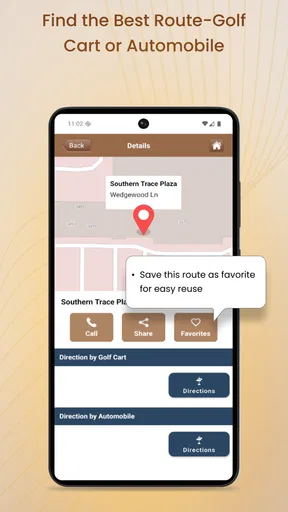
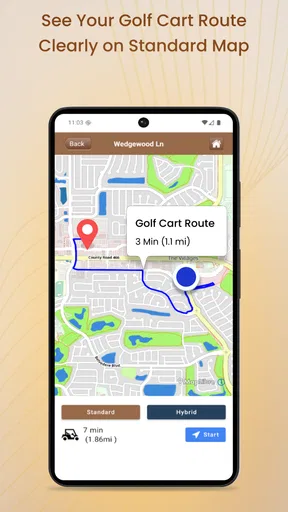
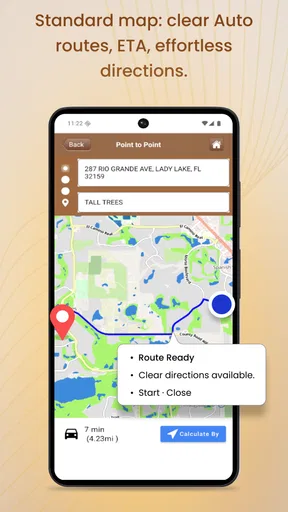
One of the standout features is the turn-by-turn navigation. Unlike generic GPS apps that might not have up-to-date info on this ever-expanding community, Villages GPS is tailored specifically for the area. It knows all the little shortcuts and backroads that typical GPS services might miss. Plus, the voice-guided directions mean you can keep your eyes on the road or the picturesque scenery.
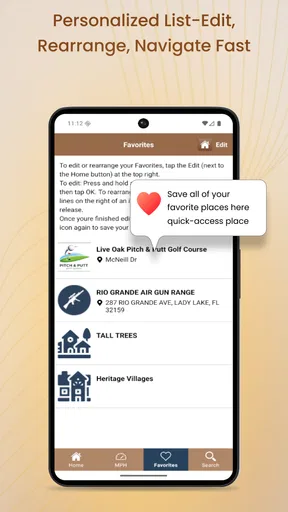
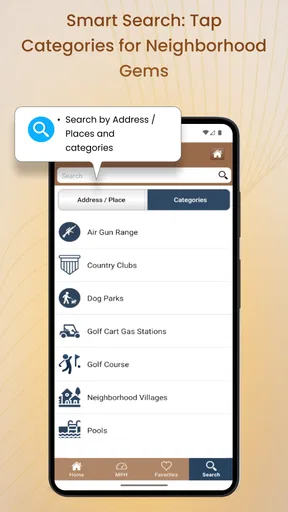
I also found the "Favorites" feature incredibly useful. You can save frequent destinations for quick access, which is perfect for those who have a few preferred haunts around town. Another handy addition is the "Nearby" function, allowing users to find the closest amenities like ATMs or gas stations with a single tap.
Keeping It Local
What sets Villages GPS apart is its focus on community. The app isn’t just about navigation; it also offers a comprehensive directory of local businesses and events. It’s a one-stop-shop for anyone living in or visiting The Villages. I particularly enjoyed the calendar section, which lists upcoming events, ensuring you never miss out on the fun.
Additionally, the app provides real-time traffic updates. Although The Villages isn’t known for heavy traffic jams, it’s still nice to know if there are any road closures or delays. This feature gives it a leg up over other navigation apps that rely solely on user-reported data.
Making daily use smoother
Favorites are most useful when they reflect real routines rather than every place you might visit once. I’d save regular destinations—home, a frequently visited recreation center, or a preferred shopping stop—so the list stays quick to scan. For a visitor, it may be better to save only the next few places on the day’s itinerary and remove them later. A short, relevant Favorites list reduces tapping and makes it easier to choose the right destination before setting off.
The Nearby option works best as a prompt for a quick local search, not as a substitute for checking whether a place suits the specific trip. If I were looking for fuel or an ATM, I’d confirm the destination and route before moving, especially if I were unfamiliar with the surrounding roads. That small pause can prevent a rushed detour, and it is a useful way to make a one-tap convenience safer in practice.
For anyone helping a relative get comfortable with navigation, I’d set up a few familiar Favorites together and practise starting a route while parked. Voice guidance can make following directions easier, but the first run is a good time to learn how the app presents turns and how to pause and reassess safely. The most helpful setup is not a complicated one; it is a small collection of destinations the person actually visits.
Little Things That Count
While testing the app, I noticed several thoughtful touches that enhance the user experience. For instance, there’s a "Notes" section where you can jot down reminders or important info about specific locations. It’s perfect for those of us with a memory like a sieve!
The app is regularly updated to ensure accuracy, which is crucial for a community that’s constantly growing. The developers clearly have a passion for the area, and it shows in their commitment to keeping the app current and reliable.
Where a local app fits beside familiar maps
Compared with a general navigation app, the advantage here is its local emphasis and the combination of directions with community information. A national map is usually the better companion when the journey starts far outside The Villages, when you need to move between regions, or when you rely on a familiar mapping workflow across many places. I wouldn’t insist on replacing that app. I’d treat this one as a focused companion for local travel and use whichever tool is better suited to the route in front of me.
There is a trade-off in that specialization. A local directory and community calendar are useful only when their entries match what you need and are current enough for your plans. Before making a special trip for an event or business, I’d check the destination details rather than assume a listing alone guarantees that hours, availability, or an event schedule have not changed. For routine navigation, that extra check may be unnecessary; for a time-sensitive visit, it is prudent.
One question worth considering before installing it is whether the app suits the device you plan to use. Its current version is 8.6, and the stated minimum operating system is 7.1. That makes compatibility a practical first check, particularly if you keep an older phone. The app is rated for Everyone, and its average is 4.4 from over 500 ratings, with more than 10,000 installs. Those figures suggest an established local audience, but they cannot tell me whether its route suggestions will suit every individual trip.
Another everyday consideration is data and connectivity. I would not assume that a route, directory, or traffic information will remain available without a connection unless I had tested that situation beforehand. If I expected to travel through an area with weak reception, I’d plan the route while connected and keep a familiar backup option available. That is not a criticism unique to this app; it is simply a sensible safeguard when navigation matters.
Keeping expectations grounded
The app’s release history reaches back to November 27, 2013, while version 8.6 is the current version. That tells me it has continued through multiple iterations, but it does not by itself prove that every road, listing, or event entry is up to date today. For existing users, the practical test is whether the destinations and directions they depend on still work for their regular journeys. I’d keep the app updated and report or work around any local detail that appears incorrect rather than assuming longevity guarantees perfect coverage.
It is also worth being clear about cost. The app is free to download, with in-app purchases listed at $8.99 per item. I’d check the purchase details shown in the app before committing to anything, and decide whether the free experience already covers the trips I need. That keeps the decision grounded in my actual routine rather than in the assumption that every available add-on is essential.
As the community changes, the details I would watch most closely are route accuracy, the usefulness of local listings, and whether event information remains relevant. Those are the areas that determine whether a focused local guide earns a place on a resident’s phone. If they continue to serve a person’s everyday destinations, the app’s narrow scope is an advantage; if the need is broader or the information no longer fits, a general map may be the better tool.
Final Thoughts
In a world where we often rely on generic apps to guide us, Villages GPS is a breath of fresh air. It’s tailored, thoughtful, and incredibly useful for anyone navigating The Villages. Whether you're a resident or just passing through, this app is a must-have tool in your digital toolkit.
With its user-friendly interface, community-focused features, and reliable navigation, Villages GPS makes exploring The Villages a breeze. So, if you find yourself in Florida’s Friendliest Hometown, make sure this app is on your phone. Trust me, your sense of direction will thank you!
Who I’d recommend it to
I’d recommend trying it if local trips around The Villages are a regular part of your week, or if you are visiting and expect to make several stops rather than follow one simple route. Residents may get the most lasting value from saving familiar destinations, while visitors can use the local focus to get oriented and then return to their usual map for travel beyond the community. If you rarely travel there, need extensive navigation outside the area, or prefer to keep every journey in one general-purpose app, it may not earn a permanent place on your home screen.
My overall view is positive, with a practical caveat: a local tool is valuable when its local information matches your needs. I’d start with a familiar, low-pressure trip, check the destination before leaving, and see whether the directions and community resources fit the way I travel. Used with that modest preparation, it can make getting around The Villages feel less like guesswork and more like a manageable part of the day.
Pros
- User-friendly interface for easy navigation.
- Accurate GPS tracking with real-time updates.
- Offline maps available for remote areas.
- Comprehensive database of villages.
- Customizable alerts for location changes.
Cons
- Limited language support beyond English.
- Occasional lag in densely populated areas.
- Consumes significant battery life quickly.
- Requires frequent updates to maintain accuracy.
- Some features locked behind a paywall.
FAQs for Villages GPS
What is Villages GPS and what does it offer?
Villages GPS is a navigation app specifically designed for residents and visitors of The Villages, a retirement community in Florida. It offers a detailed map, turn-by-turn directions, and points of interest within the community. Users can navigate golf cart paths, find recreation centers, and locate businesses easily.
Is Villages GPS available on both Android and iOS?
Yes, Villages GPS is available for download on both Android and iOS platforms. It can be found in the Google Play Store and Apple App Store, making it accessible to most smartphone users looking for a reliable navigation tool within The Villages.
Does Villages GPS work offline?
Villages GPS requires an internet connection for map updates and accurate real-time navigation. However, some basic features may still function offline, such as previously downloaded maps and saved routes, but for the best experience, an active connection is recommended.
How user-friendly is Villages GPS for first-time users?
Villages GPS is designed with user-friendliness in mind. The interface is intuitive, making it easy for first-time users to navigate through its features. The app provides clear instructions and a straightforward layout, ensuring users can effortlessly find their way around The Villages.
Are there any subscription fees or in-app purchases in Villages GPS?
Villages GPS is a paid app, meaning there is an initial purchase cost to download it. However, once purchased, there are no ongoing subscription fees. Users should check for any in-app purchases that might offer additional features or enhancements.


